
A core conversion changes far more than the system that stores member and account data. It changes how employees find information, how digital applications create records, how payments post, how documents are indexed, how reports are produced, and how dozens of connected systems exchange data with the credit union’s system of record.
That is why migration risk rarely sits in one place. A field can map correctly while the workflow that depends on it behaves differently. An interface can technically connect while sending the wrong value. A test script can pass while a real member journey still breaks because three systems were never exercised together. The conversion itself may happen over a weekend, but the risk is created or reduced in the months of preparation before that weekend.
Credit unions can reduce that risk by treating the conversion as an operating-model change rather than a database project. The work starts with clean data and clear ownership, but it extends into integrations, business rules, staff procedures, member communications, vendor coordination, contingency planning, and post-go-live validation.
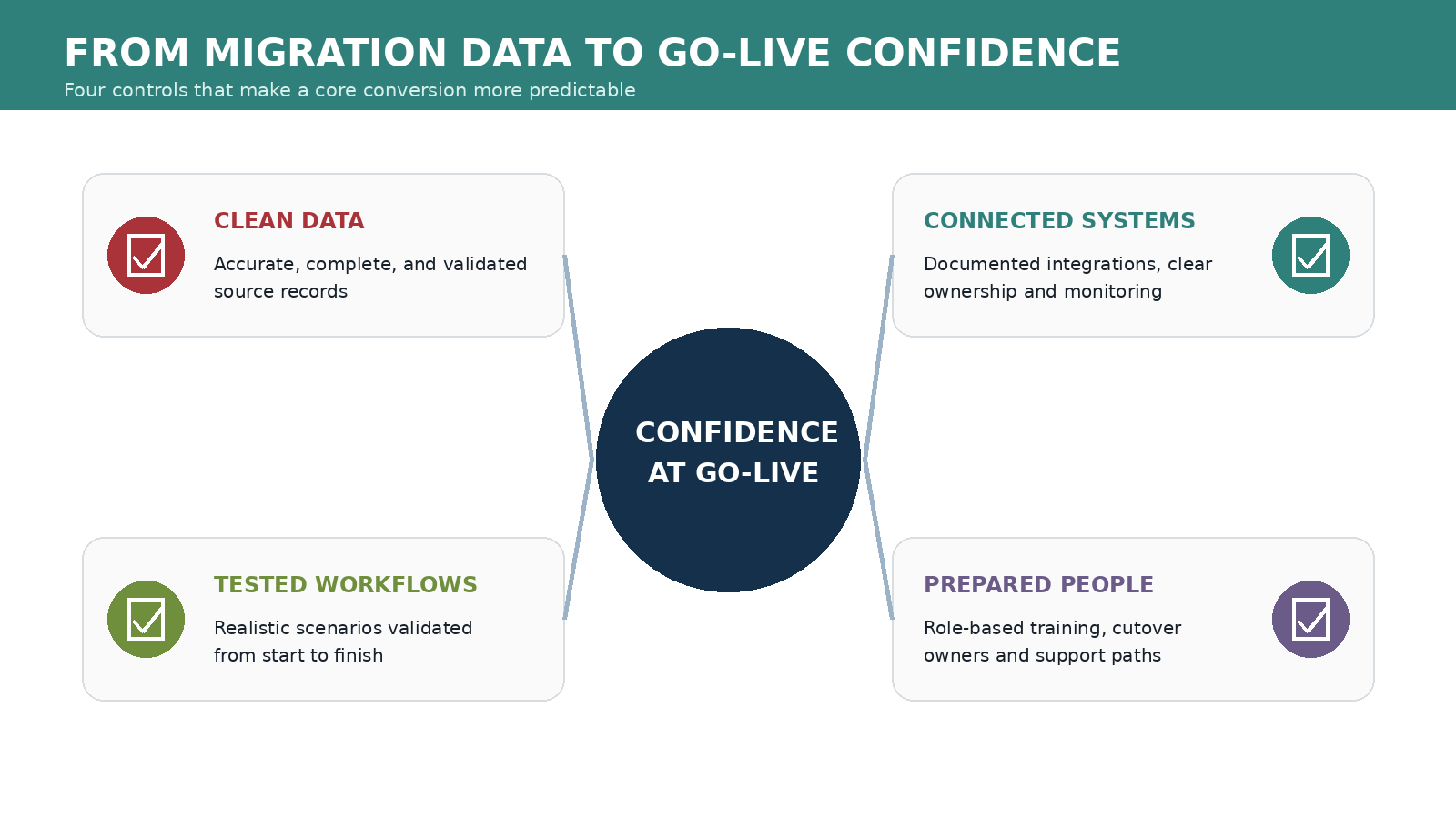
For credit unions moving to Corelation KeyStone, Symitar Episys, or another core platform, the objective should be straightforward: arrive at go-live with a new system that is not only technically available, but operationally ready. That means the data is trustworthy, the integrations are connected, the workflows have been tested end to end, and staff know how to work in the new environment.
The following framework focuses on the practical areas that most often determine whether a conversion feels controlled or chaotic.
Core Conversion Risk Starts Before the Data Moves
It is easy to think of migration risk as a problem for the conversion weekend: files are exported, transformed, imported, reconciled, and the new core comes online. By that point, however, most of the important risk decisions have already been made.
The credit union has already decided which data will move, which historical records will be retained, how product and status codes map, what third-party systems will connect to the new core, which manual processes will change, and how exceptions will be handled. If those decisions are incomplete, the cutover team inherits ambiguity at exactly the moment when there is the least time to resolve it.
NCUA’s Credit Union Profile now asks whether a credit union plans a core application conversion within the next 24 months, which reflects the supervisory importance of major technology change. The practical takeaway is not that a regulator manages the project for the credit union. It is that a core conversion is a material technology event that deserves formal planning, risk assessment, vendor oversight, and documented controls.
A low-risk conversion therefore starts with governance. Assign owners for data, integrations, business processes, testing, communications, and cutover. Define who can approve mapping decisions, who resolves exceptions, who signs off on a test cycle, and who has authority to stop a migration step if results do not reconcile. Clear ownership reduces the number of decisions that have to be improvised later.
Define Success Before You Start Mapping Fields
Before the first conversion file is built, leadership should define what a successful conversion means operationally. ‘The new core is live’ is not specific enough.
Success should describe what members and staff can actually do. Can employees see accurate balances and transaction history? Do member-facing applications write to the correct accounts and products? Do loan and share relationships map correctly? Are documents accessible? Do scheduled payments and recurring processes behave as expected? Can reports be produced with the same or better confidence than before? Are exception queues understood and staffed?
Those outcomes become the basis for testing and acceptance. Without them, teams can become overly focused on whether data moved rather than whether the business still works.
This is also the right time to identify what will intentionally change. A conversion is often an opportunity to retire obsolete codes, standardize naming conventions, remove duplicate fields, change workflow ownership, or replace manual steps with integrated automation. Those changes can improve the future environment, but they increase the need for documentation because the project is no longer a one-for-one migration.
Inventory the Current Environment and Its Hidden Dependencies
Every core has an ecosystem around it. Online banking, account opening, loan applications, payments, card systems, documents, statements, reporting, identity tools, fraud services, general ledger interfaces, and staff workflows may all read from or write to the core in different ways.
Create a dependency inventory before redesigning that ecosystem. For each connected system, document the business owner, vendor, integration method, credentials, data exchanged, frequency, timing, error handling, downstream dependencies, and member or staff impact. Include batch files, APIs, scripts, scheduled jobs, secure file transfers, manual uploads, and spreadsheet-based processes. If a dependency can affect the member record or an operational decision, it belongs on the map.
Pay particular attention to small integrations that have been running quietly for years. A nightly file may be easy to overlook precisely because it rarely causes problems. During a conversion, however, an undocumented feed can become the reason a product, report, or downstream process suddenly stops working.
The inventory is also where the credit union can decide which connections should be rebuilt, which should be retired, and which processes deserve a better design in the new environment. A conversion should not automatically reproduce every workaround that accumulated around the old core.
Clean the Data Before You Ask the New Core to Carry It
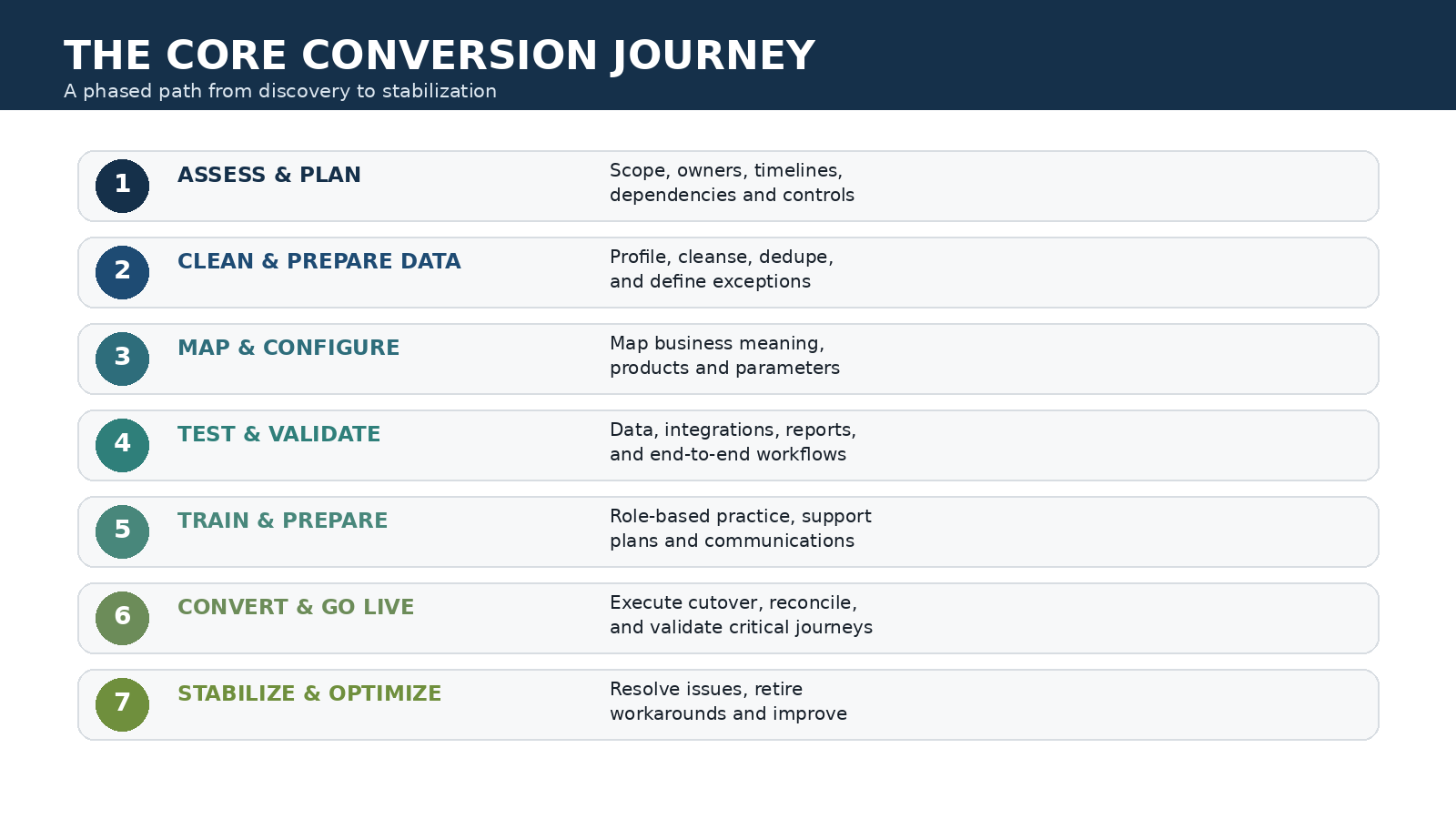
Data migration is safest when the source data is understood and cleaned before it is transformed. Moving duplicate, incomplete, inconsistent, or obsolete records into a new core only gives the problems a new home.
Start with profiling. Identify missing values, invalid formats, duplicate members, stale addresses, unusual status combinations, inactive records, inconsistent product coding, and fields that no longer support a business purpose. Then classify what can be corrected automatically, what needs business-owner review, and what should be excluded or archived.
Data validation matters because conversion logic tends to amplify source inconsistencies. If one legacy field is used differently by two departments, a technically correct mapping may still create an operational error. If a code has been repurposed over time, a simple lookup table may not be enough to determine the correct target value.
Cleaning also improves reconciliation. When the source population is stable and exceptions are already known, differences between pre-conversion and post-conversion results are easier to investigate. The team spends less time trying to determine whether a mismatch was caused by the migration or had existed for years.
Map Business Meaning, Not Just Database Fields
A field-to-field mapping document is necessary, but it is not the same as understanding the data. Two fields can have similar names and different business meaning. A member type, loan status, share code, officer code, relationship flag, or custom user field may drive workflow behavior far beyond its appearance on a screen.
For high-impact data, document three things: what the source value means today, what the target value means in the new core, and which processes depend on that meaning. That third question is critical. A mapping can look correct to the data team and still break an integration, eligibility rule, report, fee calculation, document template, or automated workflow.
Business owners should participate in mapping decisions because they understand how data is used in daily operations. Technical teams can explain structure and transformation; operations teams can explain consequence. The safest design combines both perspectives.
Keep an exception log as decisions are made. Some records will not map cleanly, and forcing them into a generic rule can create hidden defects. Document the exception, owner, resolution, and whether the same condition should be tested in future conversion cycles.
Rebuild Integrations Intentionally Around the New Core
A core conversion is also an integration conversion. Even when a third-party product remains the same, the way it connects to the core may change completely.
This is where an integration-first design can reduce long-term risk. Instead of recreating manual exports, duplicate data stores, or staff re-entry simply because those processes existed before, evaluate whether the new core can support a more direct connection. Real-time access, API-based integration, and tightly connected workflows can reduce the number of places where data drifts out of sync.
IMSI’s current solutions for Corelation KeyStone and Symitar Episys are built around that principle. The core remains the system of record while member-facing and back-office solutions exchange data with it directly. For a credit union in conversion, the relevant question is not whether every legacy interface can be reproduced exactly. It is whether the future workflow can be simpler, more reliable, and easier for staff to support.
Integration planning should include authentication, field mappings, timing, error handling, retry behavior, monitoring, logging, and ownership. A connection is not production-ready merely because a successful test message passed once. The team needs to know what happens when data is invalid, the core is unavailable, credentials expire, or a downstream service responds slowly.
Test in Layers, Then Test the Complete Member Journey
No single test cycle can prove a conversion is ready. Different kinds of testing answer different questions.
Data conversion testing asks whether records moved accurately and completely. Interface testing asks whether systems can exchange information with the new core. Functional testing asks whether a feature behaves as designed. User acceptance testing asks whether staff can complete real work. End-to-end testing asks whether the entire process succeeds across every system it touches.
That last category is where hidden conversion problems often appear. An online account opening application may validate correctly and create the member, but the wrong product code could affect a downstream document. A loan payment may post, but the confirmation or reporting feed may fail. An address change may update the core but not reach another system that still expects the legacy format.
Use realistic scenarios rather than only ideal cases. Test existing members and new members, common products and unusual products, normal transactions and exceptions, successful applications and declined ones, staff overrides, missing information, after-hours processes, and workflows that cross departments.
Reconciliation should be part of every cycle. Define expected record counts, financial totals, control totals, balances, exception counts, and other measures before the test begins. A conversion team should not have to invent its validation criteria after the output is already available.
Where Migration Risk Hides
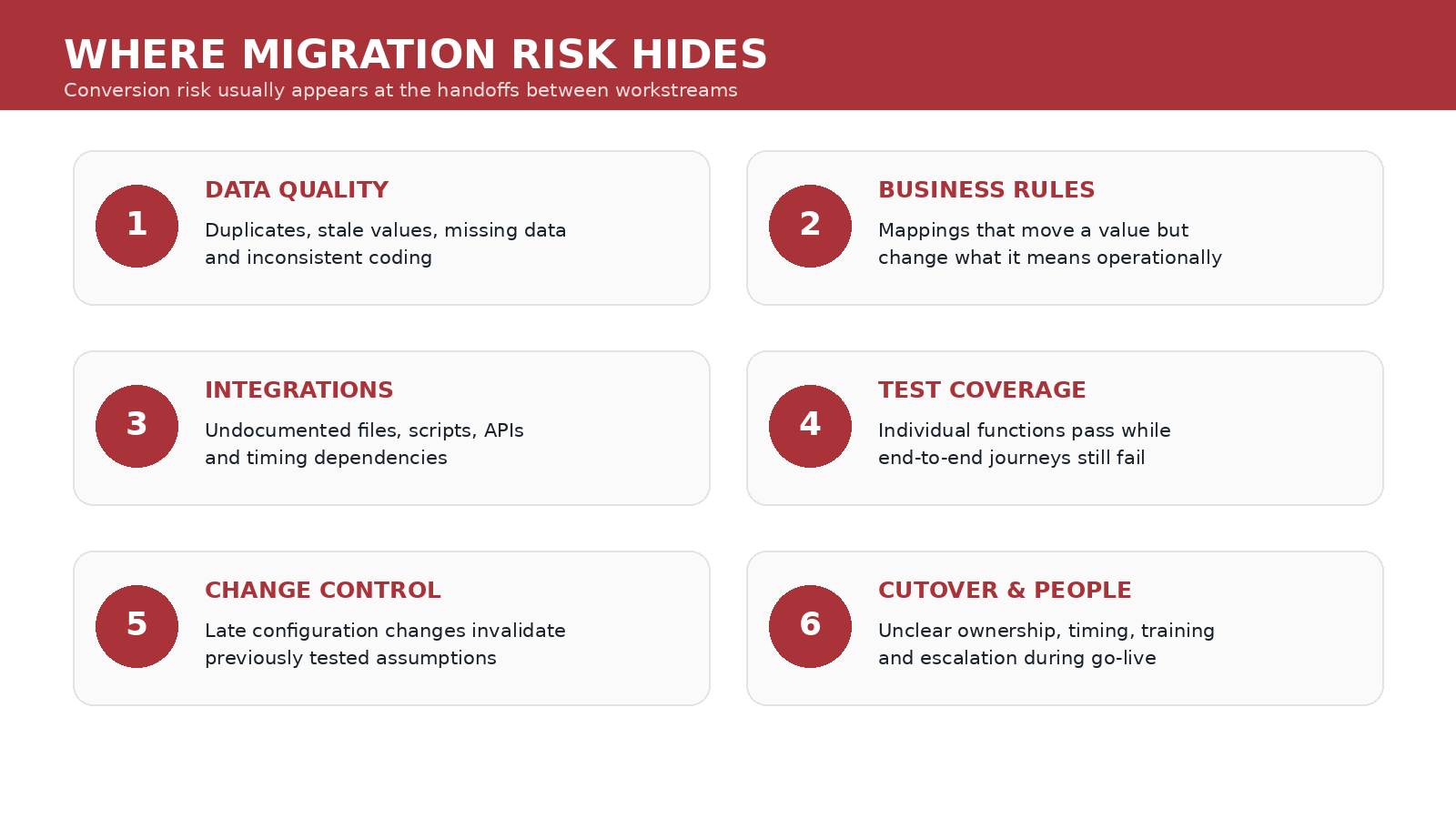
The most visible risks – bad data, a failed import, or an unavailable system – are usually already on the project plan. The more difficult risks hide between workstreams.
A business rule changes, but the integration team is not told. A vendor tests connectivity but not the credit union’s actual configuration. A data fix is applied to the next migration extract but never documented for the final conversion. Staff training uses an older configuration than the one scheduled for go-live. A test environment contains different reference data than production. A late product change invalidates mappings that already passed user acceptance testing.
These are coordination failures, which is why change control is one of the most important risk controls in a conversion. Define how changes are requested, evaluated, approved, documented, communicated, and retested. As cutover approaches, the threshold for accepting new changes should become higher because every late adjustment consumes testing capacity.
Vendor management matters for the same reason. NCUA guidance is clear that a credit union remains responsible for due diligence, vendor monitoring, cybersecurity considerations, contract oversight, and risk management even when services are outsourced. A core processor or integration vendor can perform critical work, but the credit union still needs to understand responsibilities, dependencies, escalation paths, and acceptance criteria.
Use a Conversion Freeze to Create a Stable Target
A conversion cannot be validated against a target that changes every day. Establish controlled freeze periods for product definitions, data structures, interfaces, reports, forms, and other high-impact configuration as the project moves toward final testing.
A freeze does not mean the credit union stops operating or that no urgent change can happen. It means changes require formal review because they can invalidate work that has already been tested. If an emergency configuration change must be made, the project team should know which mappings, test scripts, documentation, and interfaces need to be revisited.
Apply the same discipline to source data cleanup. If data remediation is still occurring, make sure the final extract receives every correction that was proven in earlier cycles. One of the easiest ways to reintroduce defects is to fix a test dataset without fixing the production source or transformation logic that will generate the final conversion file.
Rehearse Cutover Like an Operational Event
A detailed cutover plan should read like a sequence that another qualified team could execute, not a collection of reminders. Each step needs an owner, planned start time, prerequisite, expected duration, completion evidence, and escalation path.
Include extraction, final backups, file transfers, conversion jobs, reconciliations, integration enablement, security checks, batch schedules, user access, digital-channel validation, member communications, and business-owner signoff. Identify which steps can run in parallel and which must wait for prior confirmation.
A rehearsal is valuable because timing assumptions are often wrong. A file takes longer to transfer than expected. A reconciliation requires manual review. A vendor’s support handoff creates delay. A report that was fast with test data takes much longer with production volume. Practicing the sequence exposes those issues before the real downtime window.
The contingency plan matters just as much. Define decision points for pausing, retrying, escalating, or rolling back. The team should know in advance what constitutes an acceptable exception and what requires stopping the process. It is much harder to make those thresholds objectively at 2:00 a.m. under go-live pressure.
Protect the Member Experience Through the Change
Members may never see the new core directly, but they will experience the conversion through every channel that depends on it. Login availability, balances, transaction history, card controls, loan payments, statements, account opening, transfers, and staff service can all be affected by the change.
Build member-impact testing into the project rather than treating communications as the only member-experience workstream. Test common journeys from the member’s point of view and verify the information staff see when a member calls for help.
Communication should be specific about any planned downtime, changes to credentials or access, unavailable services, and actions members need to take. Avoid making the member responsible for understanding internal system terminology. They need to know what is changing for them, when, and what to do if something does not work as expected.
Prepare support teams for the first days after conversion with known-issue lists, escalation procedures, temporary workarounds, and clear ownership. A small technical issue can become a much larger member-experience problem when frontline staff do not know whether it is expected or where to send it.
Train Staff on Workflows, Not Just Screens
A new core introduces new navigation, terminology, permissions, and procedures. Screen-level training is necessary, but it is not enough for operational readiness.
Employees need to practice the complete workflows they will perform after go-live. What changes when a member opens an account? How is an exception handled? Where does a document go? What happens when a payment cannot be completed? Which steps are now automated, and which require staff action? Which information should no longer be maintained in a spreadsheet or secondary system?
Role-based training is more effective than broad feature tours because it connects system behavior to daily responsibilities. It also reveals configuration issues. When staff cannot complete a realistic scenario without a workaround, the problem may be the workflow design rather than the employee’s understanding.
Training should use an environment that is as close as practical to the final configuration. If product names, fields, menus, or procedures change after training, communicate the difference explicitly so employees are not surprised on day one.
Stabilize the Environment After Go-Live Before Declaring Victory
A conversion is not complete when the core opens for business Monday morning. The first days and weeks are a stabilization period where the credit union needs to distinguish normal learning curves from genuine defects.
Create a structured command process for issues. Categorize them by severity, member impact, financial impact, workaround availability, and root cause. Track whether the problem is data, configuration, integration, permissions, training, vendor behavior, or an old process that no longer fits the new system.
Continue reconciliation after go-live. Monitor balances, transaction counts, interface queues, rejected records, scheduled jobs, application completion, exception volumes, and other operational indicators that can reveal problems not visible during the first-day smoke test.
Do not let temporary workarounds become permanent by accident. Every spreadsheet, manual entry step, duplicate process, or emergency procedure created during stabilization should have an owner and a retirement decision. The objective is a stable operating model, not a new set of conversion-era workarounds.
Use the Conversion to Build a Better Integrated Environment
A core conversion is disruptive, but it also creates a rare opportunity to simplify the technology around the system of record. Credit unions are already reviewing data, integrations, workflows, vendors, roles, and policies. That is the right moment to question processes that only exist because the old environment could not support a better approach.
For Corelation KeyStone and Symitar Episys credit unions, IMS Integration focuses on tightly integrated solutions that can reduce manual re-entry, improve data consistency, and expand member self-service. Depending on the target core and workflow, solutions such as Online Account Opening, Skip-a-Pay, Loan Pay, statement tools, messaging, and other member-facing or back-office applications can be aligned with the new environment rather than carried forward as disconnected processes.
That does not mean every surrounding system should change during the conversion. Scope discipline still matters. The point is to identify which integrations are critical for day-one readiness and which improvements belong on a post-conversion roadmap. A clear roadmap prevents the credit union from recreating unnecessary technical debt simply because the old process was familiar.
A Lower-Risk Conversion Leaves the Credit Union Stronger
Reducing migration risk does not come from one perfect conversion script. It comes from disciplined preparation across data, integrations, testing, people, vendors, cutover, and stabilization.
Clean data makes mapping more reliable. Clear business rules make exceptions easier to resolve. Documented dependencies make integration work more predictable. Layered testing catches different kinds of defects. Cutover rehearsals replace assumptions with measured timing. Staff preparation reduces operational confusion. Post-go-live monitoring catches problems before temporary workarounds become permanent.
Most importantly, the conversion should leave the credit union with a technology environment that is easier to operate than the one it replaced.
If your credit union is preparing to move to Corelation KeyStone or Symitar Episys, IMSI can help evaluate the member-facing and back-office workflows that need to connect with the new core. The earlier those integrations are understood, the easier it is to include them in mapping, testing, training, and go-live planning instead of treating them as last-minute dependencies.
A core conversion will always require careful coordination. With the right preparation, it does not have to rely on last-minute heroics. Schedule a meeting with our team for guidance throughout this process.