Account takeover fraud tends to follow one path: a criminal gets a member’s login, takes control of the account, and moves money before anyone notices. The takeover step often runs through a change to the account itself, such as a new password, email address or phone number, that locks the real member out. Credit unions can break that chain by protecting every contact change, watching what happens after one, and making it easy for members to keep their details current.
What Does Account Takeover Fraud Look Like Now?
In November 2025, the FBI’s Internet Crime Complaint Center (IC3) warned that criminals are impersonating financial institution staff and support teams to take over accounts. They reach people by call, text or email, or through fake login sites, and talk them into sharing passwords and one-time passcodes. Then they log in, reset the password and move the money fast (FBI IC3, November 25, 2025).
The FBI counted more than 5,100 account takeover complaints from January to November 2025, with losses topping $262 million. The wider problem behind it is impersonation. Imposter scams were the most-reported fraud type in 2025, with more than 1 million reports and more than $3.5 billion in losses, according to the Federal Trade Commission (FTC) (FTC, March 25, 2026).
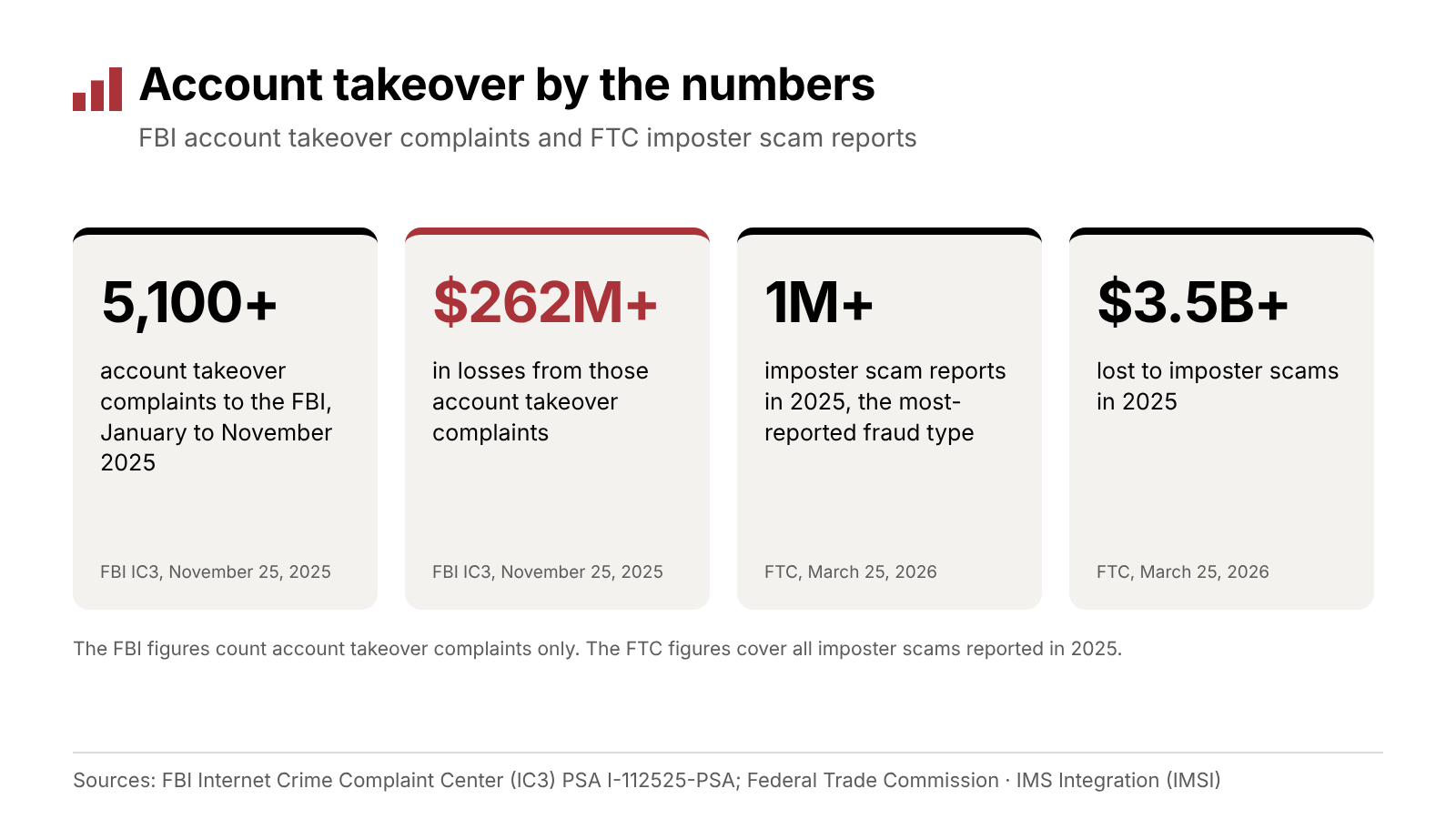
The FBI counted account takeover complaints from January to November 2025. The FTC’s imposter scam figures cover all of 2025.
The Federal Reserve keeps building out its account takeover fraud toolkit for financial institutions. In September 2026, it added new modules on prevention, detection and realistic takeover scenarios (Federal Reserve Financial Services, September 15, 2026).
Why Do Fraudsters Change Contact Details First?
Once a criminal has a member’s login, the next goal is control. The Federal Reserve’s account takeover fraud lifecycle describes it step by step: after getting in and checking balances, attackers secure the profile, initiate account detail changes and lock out the account holder (Federal Reserve account takeover fraud lifecycle).
Contact details are the natural target. When the email address or phone number changes, your alerts and one-time passcodes go to the criminal instead of the member. The member doesn’t see the warning signs, and the criminal gets time to move money.
Phone numbers carry an extra risk: SIM swapping, where a criminal gets a carrier to move a member’s number to a new SIM card. The Federal Reserve’s lifecycle lists SIM swapping as a way in. The Federal Communications Commission (FCC) has adopted rules requiring wireless carriers to use secure authentication before a SIM change and to notify the account holder when one is requested (FCC rule, Federal Register, December 8, 2023). That helps, but it’s one more reason no single check should carry the whole decision.
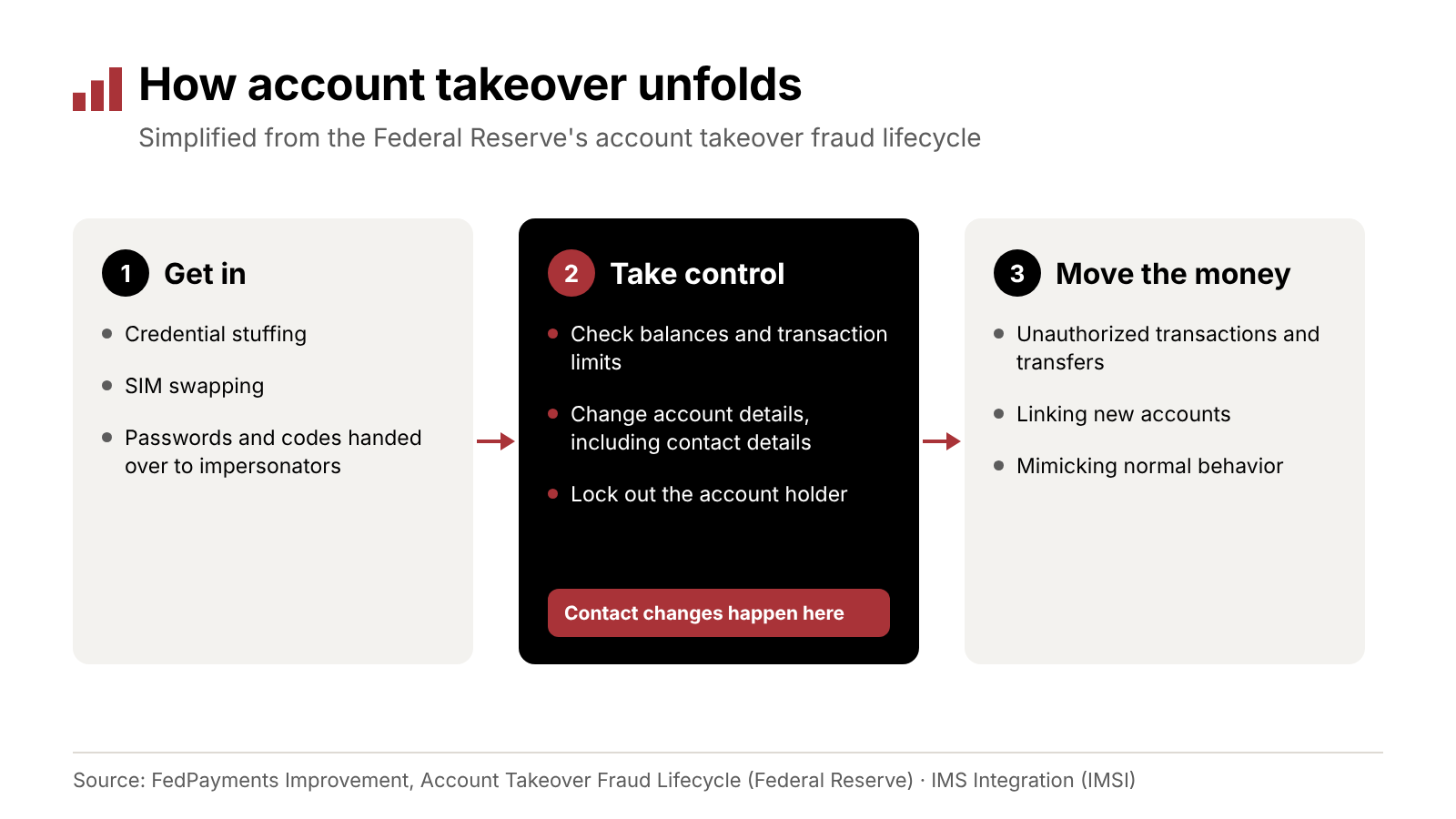
Account detail changes sit in the middle of a takeover, after criminals get in and before they move money.
Where Do Contact Changes Happen?
Members can change their details in three places, and each one needs the same standard.
- Online and mobile banking. Fast and convenient for members. The risk is a criminal who already has the login.
- Phone. Impersonators reach members by phone, text and email, and some will call your contact center posing as the member. Train staff to use the same identity check on every call, and to slow down when a caller pushes for speed.
- Branch. Usually the strongest identity check, and the slowest for the member.
Write one policy for contact changes and apply it everywhere. If one channel is easier to talk your way through, that’s where criminals will go.
Which Controls Protect a Contact Change?
The controls in this section are general practice. Credit unions can pair them with any self-service update tool, and apply the same ones to changes made by phone or in a branch.
The Federal Financial Institutions Examination Council (FFIEC) guidance on authentication, announced by the National Credit Union Administration (NCUA) in August 2021, supports layered security and treats single-factor authentication as a weakness. It asks each institution to base its controls on its own risk assessment (NCUA, August 11, 2021).
For contact changes, layered practice looks like this:
- Before the change, know who’s asking. Use multifactor authentication for online changes and the same identity check for every phone and branch request.
- During the change, confirm it. Confirm the change with the member, for example with a code sent by text. Treat higher-risk patterns, like a new phone number and a new email on the same day, as a reason for extra checks.
- After the change, watch what comes next. A contact change followed quickly by a password reset, a new payee or a large transfer deserves a closer look. Consider a review period for those transactions.
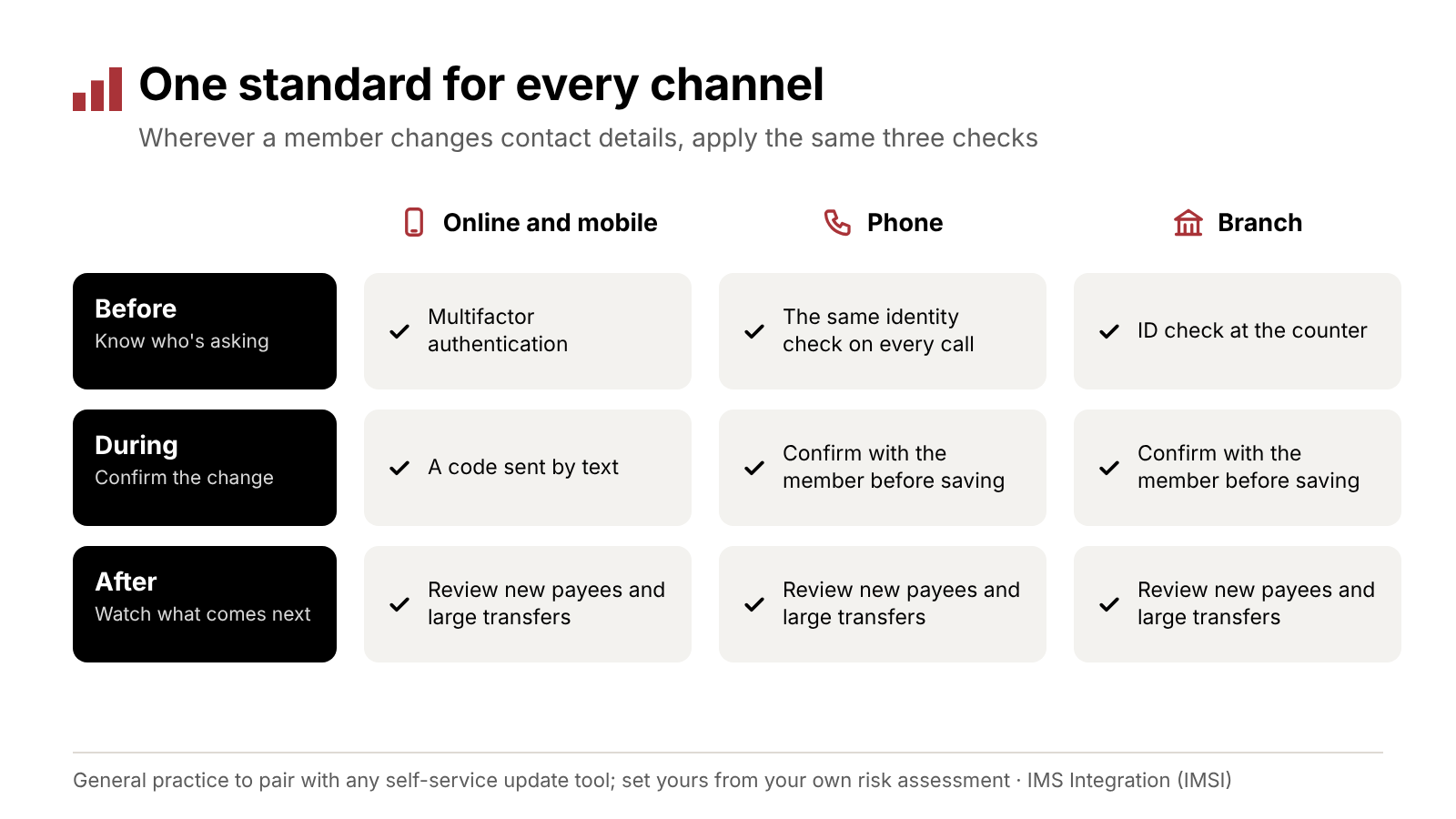
General practice for any self-service update: apply the same before, during and after checks wherever a member changes contact details.
Base the details on your own risk assessment. A small change like a new apartment number and a change to every contact method at once shouldn’t get the same treatment. These controls live in your own authentication, fraud monitoring and procedures, whichever tool or channel the member uses.
What Should You Tell Members?
Members are the first line of defense against impersonation. The FBI’s warning includes practical advice you can pass along (FBI IC3, November 25, 2025):
- Hang up and call back. Be suspicious of callers who say they’re from a financial institution, don’t trust caller ID, and call back on a number you know.
- Never share passwords or one-time codes. Companies generally don’t contact you to ask for a username, password or one-time passcode.
- Bookmark the login page. Criminals buy search ads that imitate real businesses, so don’t log in through search results or ads.
- Turn on multifactor authentication, and leave it on.
- Watch your accounts. Check balances and activity regularly.
- Report it fast. If something looks wrong, contact the credit union right away and file a complaint at ic3.gov.
Put this advice where members already look: online banking messages, your website’s security page and member newsletters.
Why Current Contact Details Are Part of the Defense
Outdated contact information is its own risk. If a member’s phone number or email is out of date, your alerts and one-time codes go nowhere, and sensitive information can end up with the wrong person.
So make updating details easy and secure: a quick self-service path for members, a confirmation step for every change, and a way to remove contact details the member no longer controls. A member who just changed phones or email providers, or who’s about to travel, is a good candidate for a reminder.
How IMSI Helps KeyStone Credit Unions
Member Info Updater, from IMS Integration (IMSI), gives members a secure, self-service way to keep their contact details current on Corelation KeyStone.
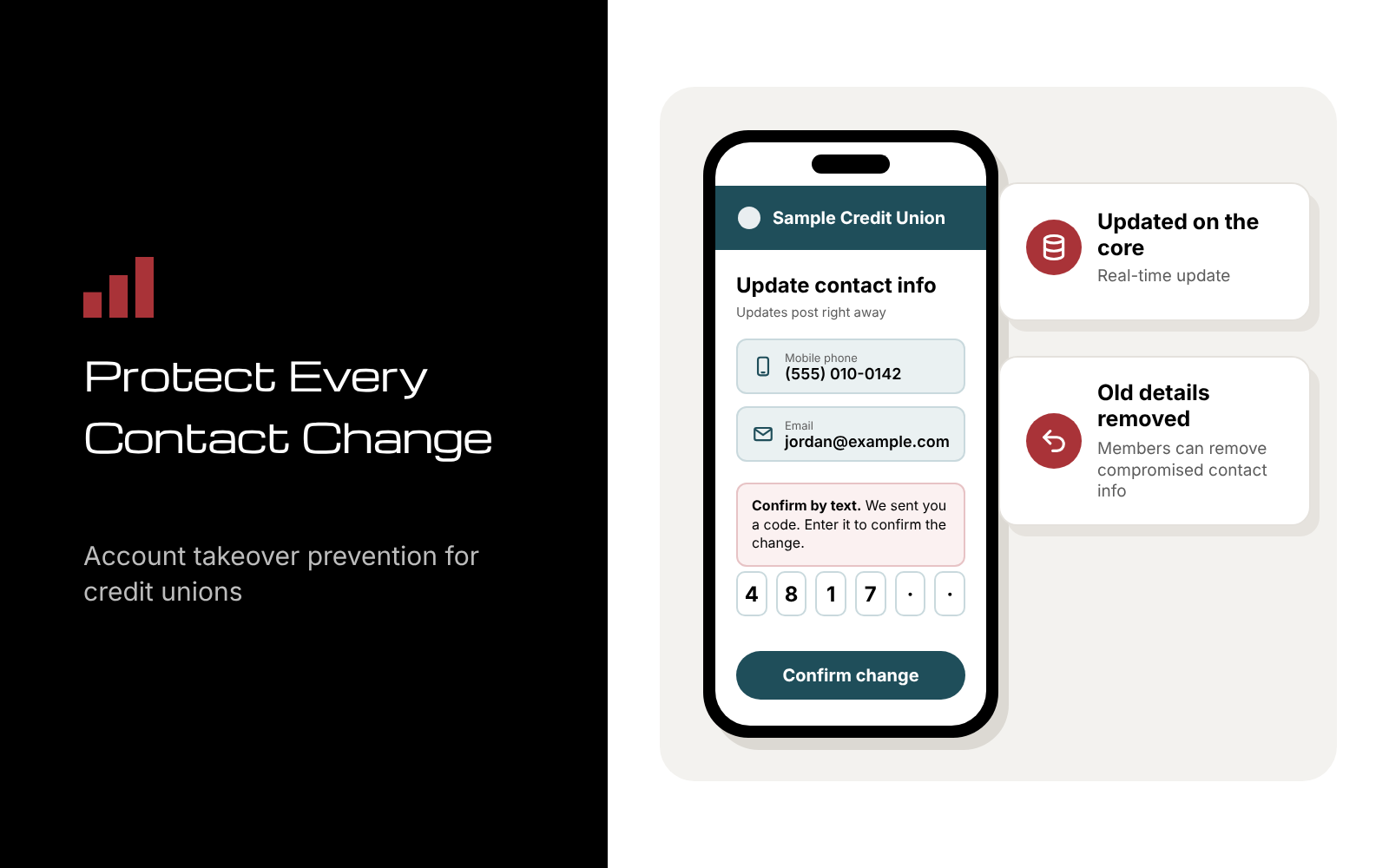
- Real-time updates on the core. Members validate and update their personal data in real time, directly within your core system.
- SMS messaging and validation. Built-in SMS validation confirms updates, which helps prevent unauthorized changes.
- Self-service access. Members can update phone numbers, email addresses and more on their own.
- Compromised details removed. Members can remove contact details that have been compromised.
- Less manual work. Automated updates reduce staff workload, manual errors, and the risk of sending sensitive information to the wrong contact.
Member Info Updater is a KeyStone solution. The before, during and after practices earlier in this post come from your own policies and systems, and you can pair them with Member Info Updater as you would with any self-service update.
That’s what more from your core looks like here: members update their own details, the change lands on KeyStone in real time, and your team spends less time on manual updates.
IMSI has been founder-led since 2007 and serves hundreds of credit unions.
Frequently Asked Questions
What is account takeover fraud? It’s when a criminal gains control of a member’s existing account, usually with stolen login details, and uses it to move money.
Why do fraudsters change contact information first? So alerts and one-time passcodes go to them instead of the member. The Federal Reserve’s lifecycle lists account detail changes as part of locking the account holder out.
Should members be able to change contact details online? Yes, with confirmation and monitoring around it. Current contact details are part of fraud prevention, and a secure self-service path keeps them current.
What should a member do if they think their account was taken over? Contact the credit union right away, reset any passwords that may have been exposed, and file a complaint with the FBI at ic3.gov.
Is Member Info Updater available on Symitar? It’s a KeyStone solution. IMSI’s solutions for Jack Henry Symitar (formerly Episys) are listed on our Symitar page.
See how Member Info Updater keeps contact details current on KeyStone. Schedule a strategy call
Related reading
- Layered Fraud Prevention in Digital Account Opening
- Vendor Due Diligence: Security Questions to Ask Before Core Access
- How Credit Unions Can Reduce Data Inconsistencies Across Operational Systems
Devon Wilson is a founding partner of IMS Integration (IMSI). He has spent more than 30 years in credit union technology helping credit unions improve their systems and service delivery, and he speaks at industry events nationwide.