
A holiday skip-a-pay promotion lets members defer one loan payment during the busiest spending months, often for a fee, usually with the loan’s term extended. Members appreciate it. Staff often dread it, because requests arrive by email, fax, and paper, and each one is checked and keyed by hand. The fix is straightforward: set clear eligibility rules, show members the terms before they confirm, and let approved requests post to the core automatically.
Why Members Love Skip-a-Pay and Staff Dread It
For members, a skipped payment in December can be the difference between a calm month and a stressful one. Holiday spending keeps climbing: U.S. retail sales for November and December 2025 grew 4.1% over the prior year, according to the CNBC/NRF Retail Monitor (National Retail Federation, January 12, 2026).
Many households head into the season stretched. The New York Fed reported that credit card balances reached $1.26 trillion in the second quarter of 2026, and that new delinquencies on auto loans and credit cards remain elevated (Federal Reserve Bank of New York, August 11, 2026). Credit unions feel it, too. The National Credit Union Administration’s (NCUA) 2026 supervisory priorities letter notes that the system’s delinquency rate and rolling 12-month loss rate are at their highest point in more than a decade (NCUA Letter 26-CU-01).
A well-run skip-a-pay program gives members breathing room and can keep a tight month from becoming a late payment. It also builds goodwill that a promotion email alone never will.
For staff, the same program can mean weeks of extra work. Requests pile up in shared inboxes. Someone checks each loan against the rules, keys the new due date, collects the fee, adds notes, and answers the calls asking whether it went through. Multiply that by a few hundred requests in the first week of December and your lending and member service teams lose the time they need for everything else.
Program Design: Eligibility, Fees, Loan Types, and Limits
Most of the staff pain in a skip-a-pay program comes from rules that are vague or applied by hand. Write the rules down first, and make each one something a system can check.
- Loan types. Decide which loans qualify. Many programs focus on consumer installment loans, such as auto and personal loans, and leave out mortgages, home equity lines, and credit cards. Open-end and closed-end loans follow different disclosure rules, so list them separately.
- Account standing. Most programs require the loan to be current. Decide how you’ll treat a member who is a few days late, and route true hardship cases to a lender instead of declining them outright.
- Seasoning and limits. Set how long a loan must be open before it qualifies, and how many skips a member can use in 12 months and over the life of the loan.
- Fees. Decide on the fee, whether you’ll waive it for the holiday promotion, and how it’s collected. Collecting it automatically from a share account removes a manual step.
- Timing. Set a clear window, such as November through mid-January, and decide which payment due dates are eligible.
Two compliance points deserve a conversation with your compliance team before launch. First, disclosures. NCUA’s legal opinion on skip-a-payment disclosures says that for closed-end loans, a skip offered after the loan is made doesn’t require new Regulation Z disclosures, and deferring a payment isn’t a refinancing on its own (NCUA Legal Opinion 05-0903).
Open-end credit has its own change-in-terms rules, which America’s Credit Unions walks through in a recent compliance post (America’s Credit Unions). Ask counsel how your specific fee is treated.
Second, fairness. The same NCUA opinion flags fair lending when setting eligibility criteria. Rules applied by a system, the same way for every member, are easier to defend than judgment calls made in a busy inbox.
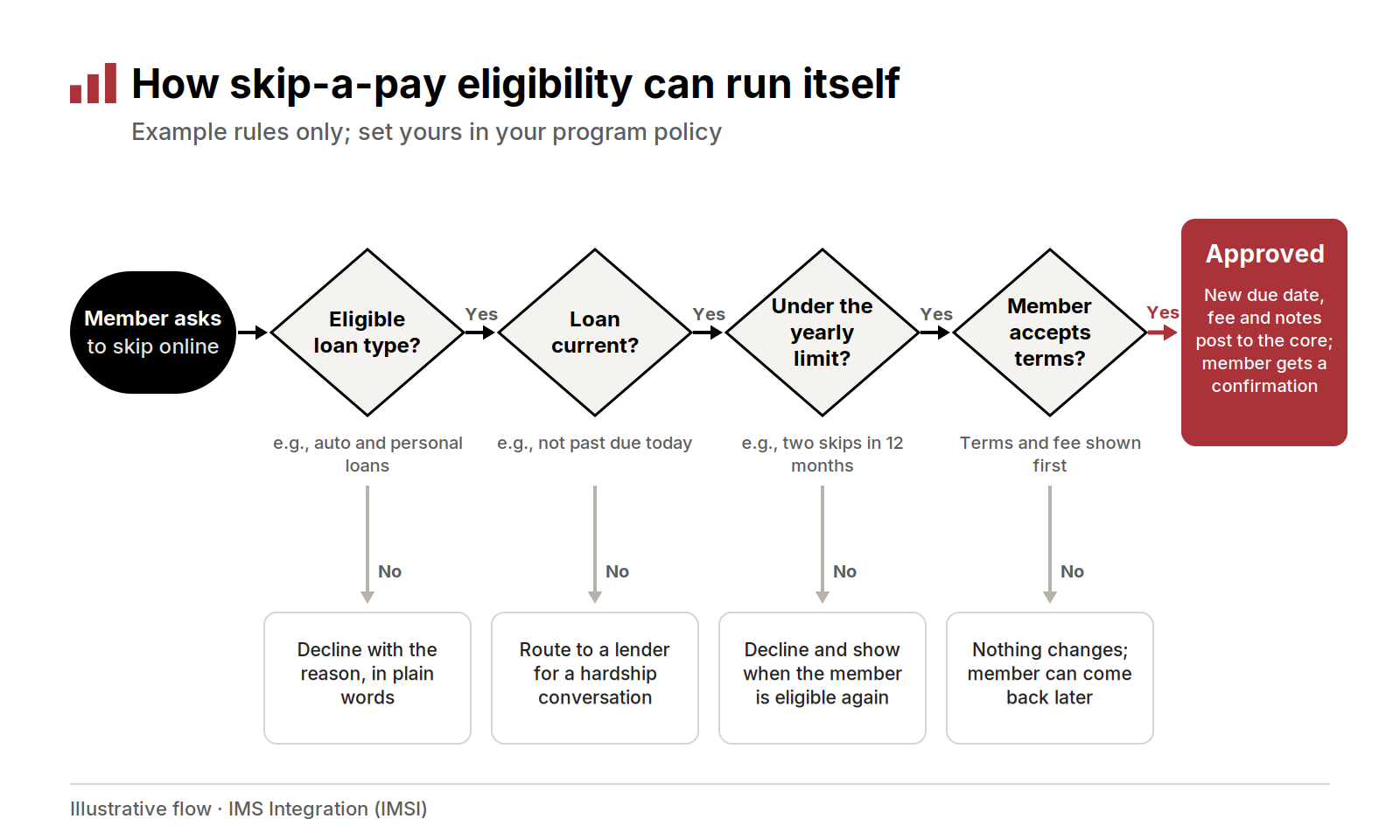
Four example checks decide each request; every “no” ends in a clear next step for the member, and every “yes” posts to the core.
What Members Should See Before They Confirm
A skip is a loan change, and members deserve to understand it before they say yes. Put the key terms on the screen, in plain words, right before the confirm button.
- Interest keeps accruing. On most simple-interest loans, interest continues during the skipped month, so the member pays more over the life of the loan.
- The term changes. A skipped payment usually extends the maturity date, or it’s handled with a larger final payment. Industry compliance guidance suggests stating the new repayment terms in the skip agreement (CUInsight).
- Protection products may be affected. Read your guaranteed asset protection (GAP) and payment protection contracts. Some coverage doesn’t extend past the original maturity date or doesn’t cover a shortfall created by skipped payments. Tell members plainly.
- The fee, up front. Show the amount and where it will be taken from before the member confirms.
Just as important is what happens after the member says yes. An approved skip has to reach every system that acts on due dates. In an October 2024 review of auto lending, the Consumer Financial Protection Bureau found that some servicers repossessed vehicles even after consumers had made payments or obtained extensions that should have prevented it (CFPB Supervisory Highlights, Issue 35). If the new due date lives only in an email thread, your collections queue and credit reporting won’t know about it.
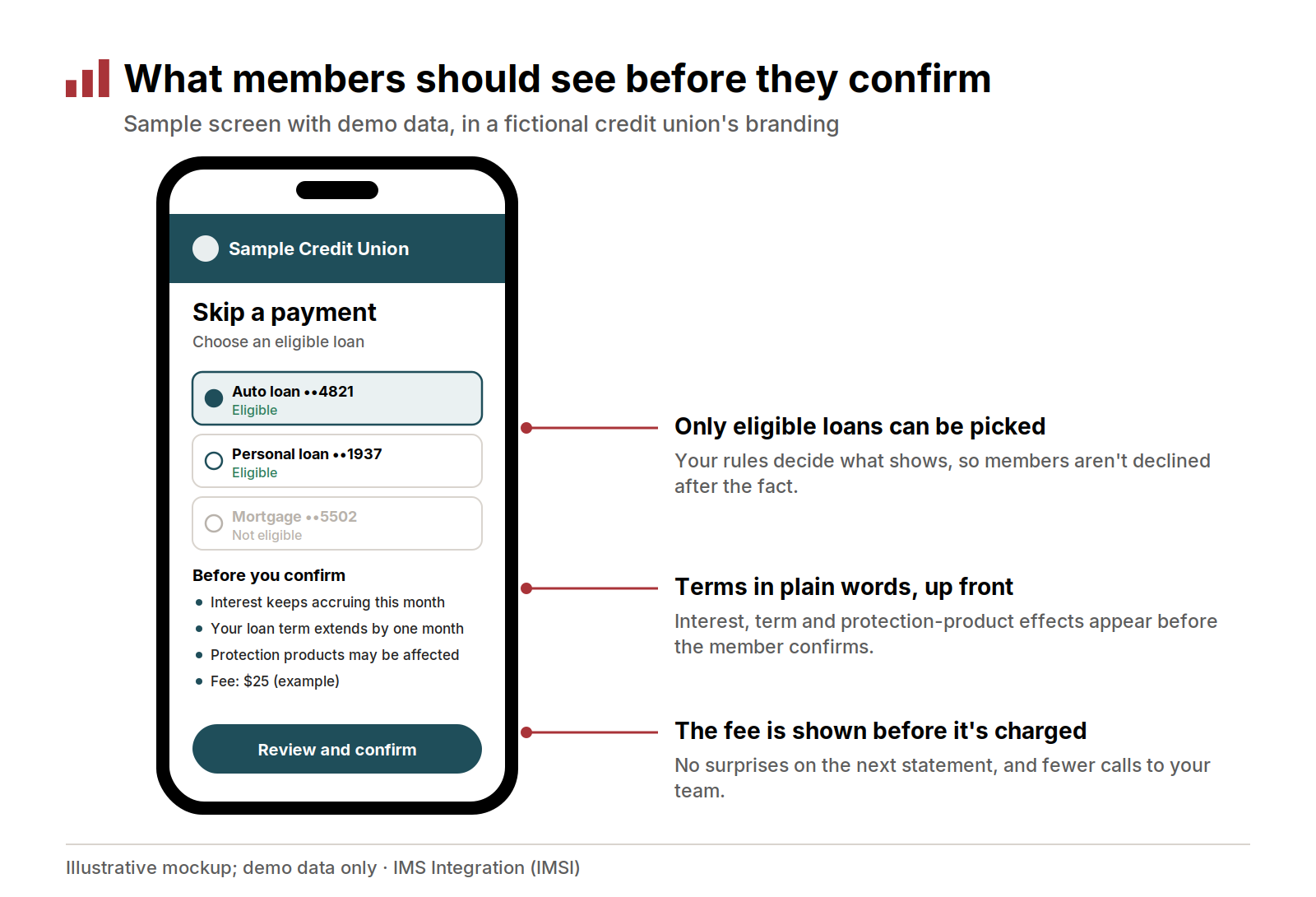
A sample member screen (demo data): eligible loans only, the terms in plain words, and the fee shown before the member confirms.
Automating Eligibility and Posting
Once the rules are written down, most of the work can run without a person. The member signs in, sees only the loans that qualify, reads the terms, and confirms. The system checks eligibility against the core, collects the fee, updates the due date, adds notes, and sends a confirmation. Staff see only the requests that don’t fit the rules.
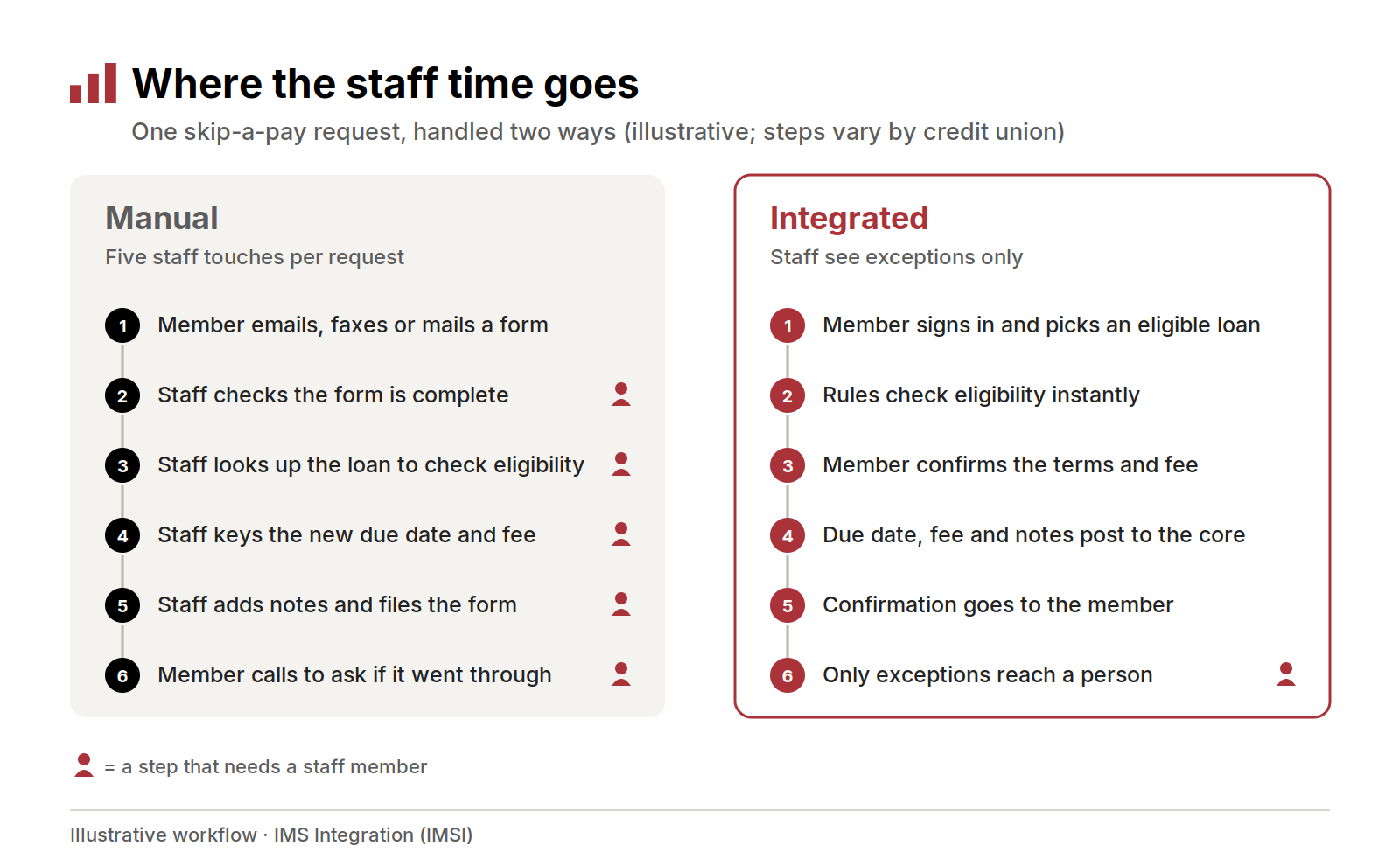
The same request handled two ways: five staff touches in a manual process, and staff involvement only for exceptions when the workflow is integrated with the core.
Three things make automation hold up in a busy season:
- The rules read live core data. Eligibility should be checked against the loan as it stands today, not an export from last week.
- The change posts to the core. The new due date, fee, and notes should land in the core in real time, so collections, statements, and reporting all see the same thing.
- Exceptions have a home. Requests that fail a rule, or that suggest real hardship, should route to a named queue with the member’s details attached, not to a general inbox.
There’s a supervisory reason to care, too. NCUA’s 2026 priorities letter says examiners may review loss mitigation programs, including loan modifications and workouts (NCUA Letter 26-CU-01). A system that records every request, rule check, and decision gives you a clean record of how your program actually ran.
Promoting It Without Flooding the Call Center
A great promotion can still swamp your team if every member who reads the email picks up the phone. A few habits keep the volume manageable.
- Send the offer to members who qualify. Build the list from the same core data your eligibility rules use. The members you email are then the members who will see an eligible loan when they sign in, which means fewer declines and fewer calls.
- Link straight to the request. Put the link inside online and mobile banking, where members are already signed in, rather than on a public page that sends them to log in.
- Answer questions before they’re asked. Put interest, term, fee, and protection-product answers on the promotion page, in the same words members will see on the request screen.
- Stagger your sends. Spread the email over several days so requests and questions arrive at a steady pace.
- Brief the front line. Give member service a one-page summary of the rules and the exception process before the first email goes out.
- Watch the queue daily. Check exception volume and decline reasons in the first week. If one rule is causing most declines, fix the wording or the rule.
Keep hardship in view. A skip is a short-term courtesy, not a fix for a member who is falling behind every month. Make it easy for staff to spot those members and offer a real conversation about options.
How IMSI’s Skip-a-Pay Works on KeyStone and Symitar
IMS Integration (IMSI) offers Skip-a-Pay, which lets members skip an eligible loan payment online, any time. It follows your credit union’s rules and posts straight to the core, with nothing to re-key. It runs on both Corelation KeyStone and Jack Henry Symitar (formerly Episys).
Each deployment is configured to your products, eligibility rules, and brand. Your team decides the rules, and we set them up with you.
Here’s how the pieces fit during a busy season:
- Requests that pass your rules post themselves. Skip-a-Pay reads from and writes to the core. On KeyStone, an approved request automatically creates a loan extension record on the core and adjusts the payment due date.
- Requests arrive in one place. Skip-a-Pay requests arrive validated in one Workbox queue for your team, instead of scattering across inboxes.
- Follow-up stays secure. If a request needs a conversation, Workbox Messaging Center lets staff and members exchange messages and documents securely, in one place.
- Loan Payment for January. Skip-a-Pay pairs naturally with Loan Payment, which lets members make secure online loan payments that post to the core. When payments resume, members can pay the same way they skipped: online, without a call.
If you already run Skip-a-Pay, now is a good time to review this season’s rules, fee waivers, and promotion window with your IMSI account team.
Frequently Asked Questions
How does a credit union skip-a-pay program work? The credit union sets rules for which loans qualify, how often members can skip, and what it costs. Eligible members request a skip, confirm the terms, and the due date moves forward by one payment, usually extending the loan’s term.
Does a skipped payment hurt a member’s credit? It shouldn’t, if the skip is approved before the due date and the new due date is recorded in the core. Confirm your credit reporting treatment with your compliance team.
Is a skip-a-pay fee a finance charge? It depends on how the fee is structured and whether the loan is open-end or closed-end. Have counsel confirm your treatment before you launch.
Can members skip a credit card payment? That’s a program decision. Many programs focus on installment loans, and open-end credit follows different disclosure rules.
Ready to take the manual work out of skip season? Schedule a strategy call
Related reading
- Secure and Convenient: How an Integrated Loan Payment Solution Supports Members
- Reducing Manual Workload with Rules-Based Automation
- What to Expect From Your Annual Workflow Review
This post is for general information and is not legal or compliance advice.
Devon Wilson is a founding partner of IMS Integration (IMSI). He has spent more than 30 years in credit union technology helping credit unions improve their systems and service delivery, and he speaks at industry events nationwide.